1
/
of
11
SANWA SUPPLY
USB Type-C Docking Station USB-DKM2BK
USB Type-C Docking Station USB-DKM2BK
GTIN(JAN):4969887826607
SKU:USB-DKM2BK
Regular price
¥13,649 JPY
Regular price
Sale price
¥13,649 JPY
Quantity
Couldn't load pickup availability
Important: Return Policy
Please review your order carefully before completing the purchase. We do not accept returns or exchanges for customer errors (e.g., wrong size, color, or accidental purchase)
[Mobile docking station equipped with VGA, HDMI, DisplayPort, and LAN ports]
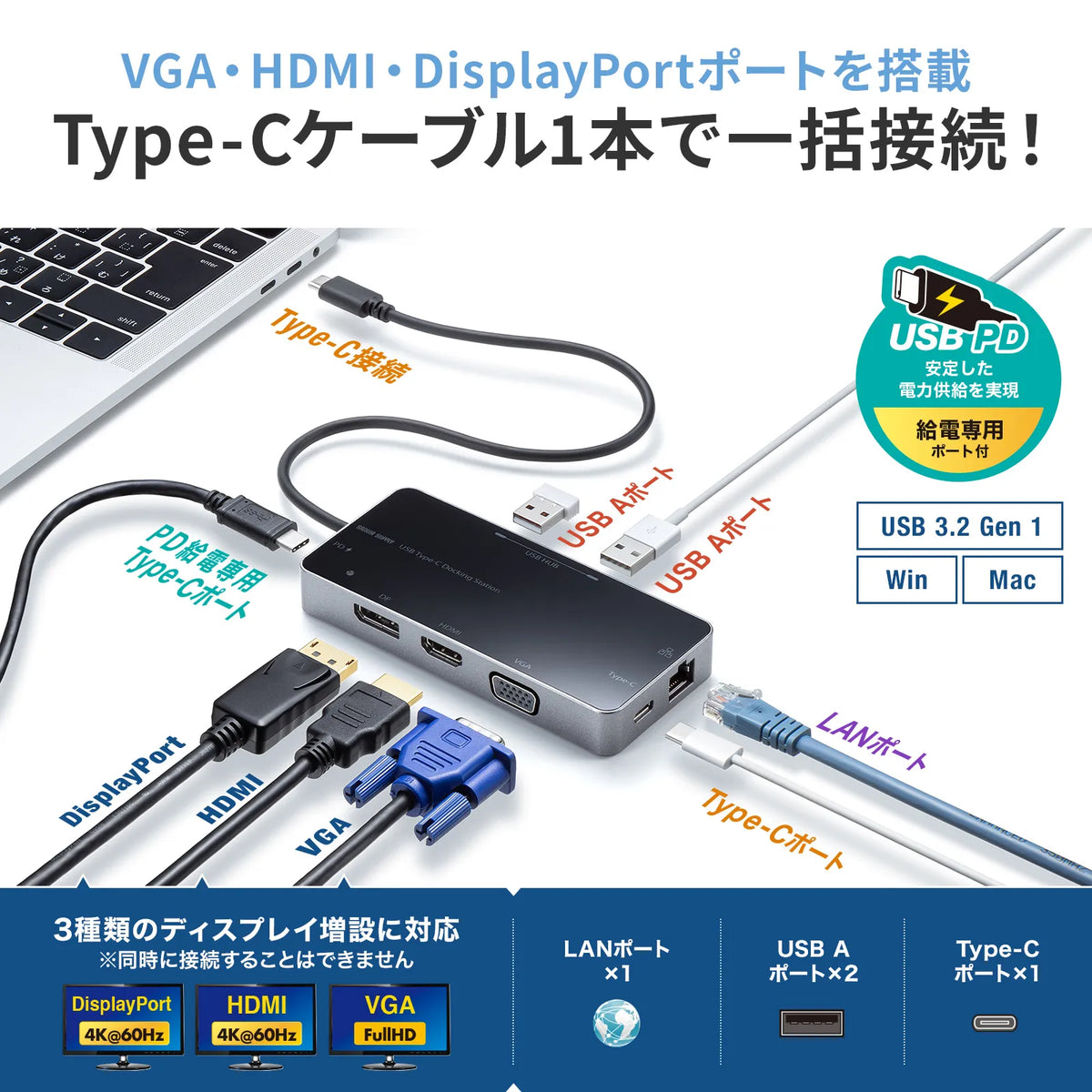
●This USB Type-C docking station allows you to expand connections to HDMI displays, VGA displays, DisplayPort, USB devices, and wired LAN with just one Type-C cable.
●With just one Type-C cable connection, you can comfortably operate with a large screen display and USB devices, and when you are out or going to a meeting, you can quickly carry it with you by simply unplugging the Type-C cable.
●You can easily create a multi-display environment (mirror mode/extended mode) without installing any software to support "DisplayPort Alternate Mode" for adding an HDMI display via USB Type-C connection.
●It supports "USB Power Delivery (USB PD)" via USB Type-C, and power can also be supplied to the connected computer via this product.
●It supports Gigabit Ethernet, so it is compatible with Gigabit network environments and allows wired LAN connection with just one Type-C cable.
≪Please check before purchasing≫
※Please connect this product directly to the Type-C port of your computer. This product cannot be used with USB hubs or additional USB ports.
※Although this product supports USB PD (Power Delivery), it does not support all USB Type-C equipped devices (PD compatible).
※While this product is basically plug-and-play for disconnection and connection, in rare cases, it may not display or operate correctly due to a timing error in USB recognition. Please try unplugging and plugging it back in. This is not a defect or malfunction of this product.
※Even with compatible models and compatible connected devices/environments, it may not operate correctly.
※When connecting USB 2.0/1.1 standard products, please note that the maximum transfer speed will be that of the slower standard.
※Although this product is a USB Type-C docking station, it does not guarantee connection and operation with all USB Type-C devices.
※This product supports the USB 5Gbps standard, but the 5Gbps transfer speed is a standard value.
※USB scanners, multifunction printers with scanners, and USB devices that are sensitive to USB device recognition may not operate correctly via a USB hub.
*It can also be used as a self-powered device using the PD-compatible AC adapter included with the PC.
*While it supports Wake On LAN functionality, compatibility varies depending on the PC model, so operation is not guaranteed.
<PC Connection Terminal>
■Connector Shape: USB Type-C
■Supported Standards: USB 5Gbps (USB3.2 Gen1/3.1 Gen1/3.0) compliant
*USB 5Gbps is the same standard as USB3.2 Gen1 (USB3.1 Gen1/USB3.0), which was renamed by USB-IF (USB Implementers Forum).
■Cable length: Approximately 30cm
■Cable type: Integrated cable
<USB Ports>
■Number of ports: 4 ports
■Maximum data transfer speed (theoretical value): 5Gbps
■USB Type-C female/USB 5Gbps: 2 ports
■Supply current: Maximum 1500mA
(Total for all ports/bus powered)
*If the current consumption of the connected device exceeds the supply current of this product, it may not operate properly with bus power.
<Power Supply>
■Power supply method: Bus power/Self power (when power is connected)
■USB PD input port: Yes
■USB PD maximum input: 100W
*Depending on the computer or PD power adapter you are using, a warning may be displayed recommending the use of the power adapter included with your computer, but this does not affect its use.
<Video Output Port>
■Number of Supported Output Displays: 1
■Maximum Supported Resolution: 4K/60Hz
*The listed supported resolutions require your computer to support DisplayPort Alt Mode (DP1.4 or higher).
*For 4K resolution output, the display must support 4K resolution, and the content being output must also support 4K resolution.
■Maximum Supported Resolution/Refresh Rate: 3840x2160
■HDCP: 1.4
■HDMI: 1 port
■DisplayPort: 1 port
■VGA: 1 port
<LAN Port>
■Port Shape: RJ-45 port (Auto MDI/MDI-X), Auto-Negotiation compatible
*While Wake On LAN functionality is supported, compatibility varies depending on the computer model, so operation is not guaranteed.
*Depending on the connected device, you may need to turn off Wi-Fi to use a wired network.
■Supported standards: IEEE802.3 (10BASE-T), IEEE802.3u (100BASE-TX), IEEE802.3ab (1000BASE-T)
■Transmission speed (theoretical value): 1000Mbps, 100Mbps, 10Mbps
*Regarding communication speed, 1000BASE-T is supported only when connected via USB 5Gbps (USB3.2 Gen1).
■Access method: CSMA/CD
<Common specifications>
■Driver: Not required
■Total number of ports: 8
■Size: W120xD55xH17mm
■Weight: Approx. 108g
■Set contents: Instruction manual
●This USB Type-C docking station allows you to expand connections to HDMI displays, VGA displays, DisplayPort, USB devices, and wired LAN with just one Type-C cable.
●With just one Type-C cable connection, you can comfortably operate with a large screen display and USB devices, and when you are out or going to a meeting, you can quickly carry it with you by simply unplugging the Type-C cable.
●You can easily create a multi-display environment (mirror mode/extended mode) without installing any software to support "DisplayPort Alternate Mode" for adding an HDMI display via USB Type-C connection.
●It supports "USB Power Delivery (USB PD)" via USB Type-C, and power can also be supplied to the connected computer via this product.
●It supports Gigabit Ethernet, so it is compatible with Gigabit network environments and allows wired LAN connection with just one Type-C cable.
≪Please check before purchasing≫
※Please connect this product directly to the Type-C port of your computer. This product cannot be used with USB hubs or additional USB ports.
※Although this product supports USB PD (Power Delivery), it does not support all USB Type-C equipped devices (PD compatible).
※While this product is basically plug-and-play for disconnection and connection, in rare cases, it may not display or operate correctly due to a timing error in USB recognition. Please try unplugging and plugging it back in. This is not a defect or malfunction of this product.
※Even with compatible models and compatible connected devices/environments, it may not operate correctly.
※When connecting USB 2.0/1.1 standard products, please note that the maximum transfer speed will be that of the slower standard.
※Although this product is a USB Type-C docking station, it does not guarantee connection and operation with all USB Type-C devices.
※This product supports the USB 5Gbps standard, but the 5Gbps transfer speed is a standard value.
※USB scanners, multifunction printers with scanners, and USB devices that are sensitive to USB device recognition may not operate correctly via a USB hub.
*It can also be used as a self-powered device using the PD-compatible AC adapter included with the PC.
*While it supports Wake On LAN functionality, compatibility varies depending on the PC model, so operation is not guaranteed.
<PC Connection Terminal>
■Connector Shape: USB Type-C
■Supported Standards: USB 5Gbps (USB3.2 Gen1/3.1 Gen1/3.0) compliant
*USB 5Gbps is the same standard as USB3.2 Gen1 (USB3.1 Gen1/USB3.0), which was renamed by USB-IF (USB Implementers Forum).
■Cable length: Approximately 30cm
■Cable type: Integrated cable
<USB Ports>
■Number of ports: 4 ports
■Maximum data transfer speed (theoretical value): 5Gbps
■USB Type-C female/USB 5Gbps: 2 ports
■Supply current: Maximum 1500mA
(Total for all ports/bus powered)
*If the current consumption of the connected device exceeds the supply current of this product, it may not operate properly with bus power.
<Power Supply>
■Power supply method: Bus power/Self power (when power is connected)
■USB PD input port: Yes
■USB PD maximum input: 100W
*Depending on the computer or PD power adapter you are using, a warning may be displayed recommending the use of the power adapter included with your computer, but this does not affect its use.
<Video Output Port>
■Number of Supported Output Displays: 1
■Maximum Supported Resolution: 4K/60Hz
*The listed supported resolutions require your computer to support DisplayPort Alt Mode (DP1.4 or higher).
*For 4K resolution output, the display must support 4K resolution, and the content being output must also support 4K resolution.
■Maximum Supported Resolution/Refresh Rate: 3840x2160
■HDCP: 1.4
■HDMI: 1 port
■DisplayPort: 1 port
■VGA: 1 port
<LAN Port>
■Port Shape: RJ-45 port (Auto MDI/MDI-X), Auto-Negotiation compatible
*While Wake On LAN functionality is supported, compatibility varies depending on the computer model, so operation is not guaranteed.
*Depending on the connected device, you may need to turn off Wi-Fi to use a wired network.
■Supported standards: IEEE802.3 (10BASE-T), IEEE802.3u (100BASE-TX), IEEE802.3ab (1000BASE-T)
■Transmission speed (theoretical value): 1000Mbps, 100Mbps, 10Mbps
*Regarding communication speed, 1000BASE-T is supported only when connected via USB 5Gbps (USB3.2 Gen1).
■Access method: CSMA/CD
<Common specifications>
■Driver: Not required
■Total number of ports: 8
■Size: W120xD55xH17mm
■Weight: Approx. 108g
■Set contents: Instruction manual
Share