1
/
of
11
SANWA SUPPLY
Automatic PC switch with remote control (2:1) SW-KVM2WVUN2
Automatic PC switch with remote control (2:1) SW-KVM2WVUN2
GTIN(JAN):4969887594643
SKU:SW-KVM2WVUN2
Regular price
¥15,827 JPY
Regular price
Sale price
¥15,827 JPY
Quantity
Couldn't load pickup availability
Important: Return Policy
Please review your order carefully before completing the purchase. We do not accept returns or exchanges for customer errors (e.g., wrong size, color, or accidental purchase)
[Supports USB keyboards, mice, and analog displays. A slim, cable-type KVM with a hand-held switch.]
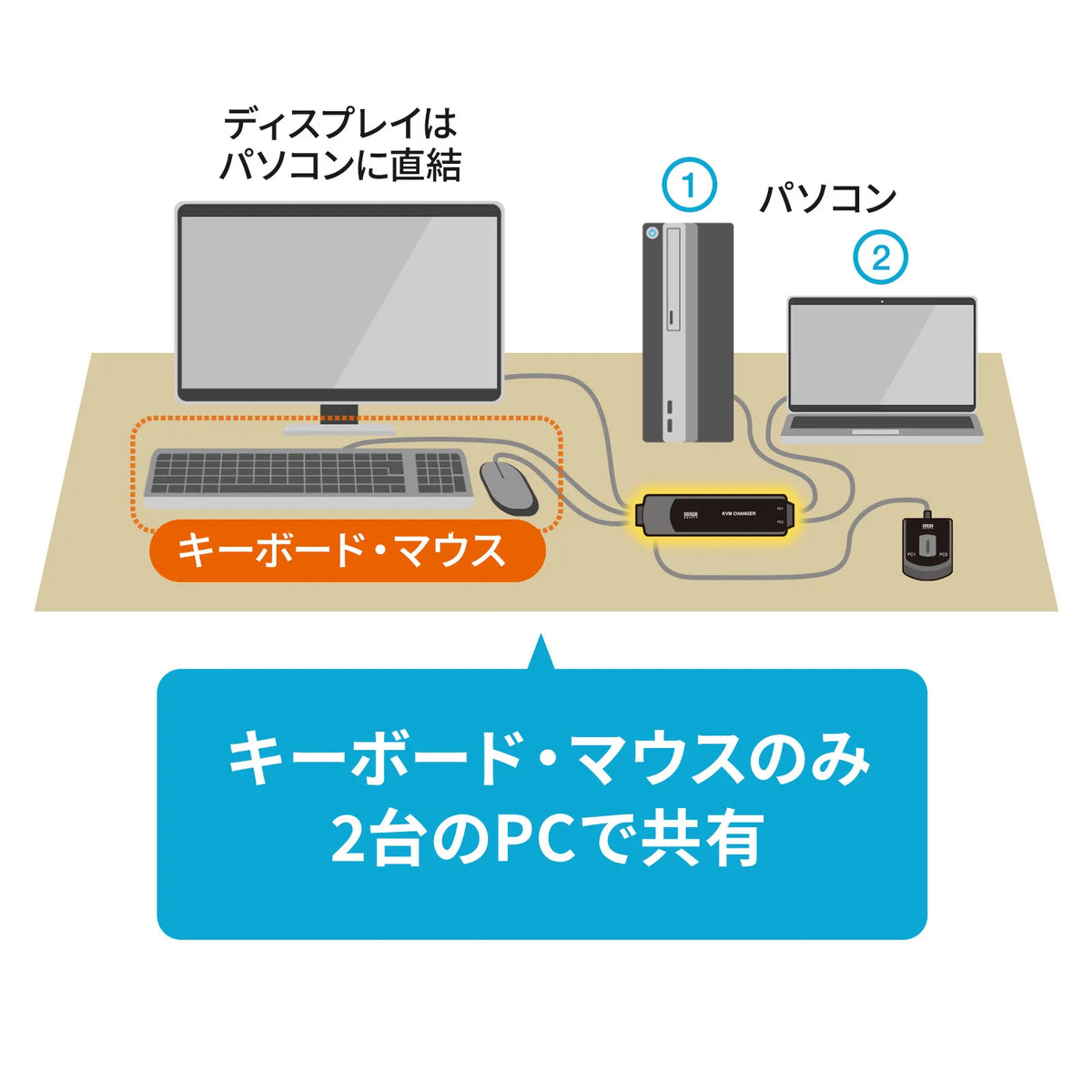
●In addition to hotkey switching, you can easily switch using the extension hand-held switch that can be placed within easy reach.
●You can lock the switching function (disable hotkeys) by pressing the [Ctrl] key + [F12] key. This product can be used even with games and applications that frequently use the [Ctrl] key.
●You can choose between "Ctrl x 2 + Enter" or "Scr Lock x 2 + Enter" as the hotkey, which can be avoided even if the hotkeys of your software overlap.
●Since the KVM connects directly to the display's VGA port, a display cable is not required. Also, because it is a direct connection, it is resistant to noise and the connection is neat. *1
●This product does not require any software installation. You can use it immediately by simply connecting the switch.
●The keyboard and mouse are USB connected, and the mouse supports multi-function buttons and tilt wheel functions.
●Because the keyboard port is emulated, you can start two computers at the same time. Furthermore, it can fully boot up without switching ports during a restart (reboot).
●Equipped with an auto-scan mode that automatically switches between two connected computers.
●This product is silent, with no switching sound (beep) during switching.
●It operates by receiving power from the computer's USB keyboard port, so an AC adapter is not required.
●Even in environments where one is Windows and the other is Mac, one console can be shared. Switching is also possible in mixed environments of Windows OS and Linux OS.
※1 It cannot be connected to models where the display cable is integrated with the display. Please use a conversion adapter, etc.
■Interface (PC side):
Display/Mini D-sub (HD) 15pin male x2
Keyboard/USB A connector male x2
Mouse/USB A connector male x2
■Interface (peripheral device side):
Display/Mini D-sub (HD) 15pin male x1
Keyboard/USB A connector female x1
Mouse/USB A connector female x1
■Maximum number of connected PCs: 2
■Switching method: Hotkey switching, auto scan switching, hand switch
*Hotkey switching (switch between PC A and B)...[Ctrl][Ctrl][Enter] or [ScrLock][ScrLock][Enter] (select one)
*Auto scan switching (automatically switches between them)...[Ctrl][Ctrl][A/a][Enter] or [ScrLock][ScrLock][A/a][Enter] (select one)
*Disable auto scan mode...Press the [Space] key once
Hotkey lock...[Ctrl] + [F12] (press again to release)
■Display emulation function: None
■19-inch rack mountable: None
■Power supply: Power supplied from USB port/DC +5V
■Current consumption: 50mA (maximum)
■Power consumption: 0.25W (maximum)
■Operating temperature and humidity: Temperature/0 to 50°C, Humidity/85% or less (non-condensing)
■Storage temperature and humidity: Temperature/-20 to 60°C, Humidity/90% or less (non-condensing)
■Cable length: PC1/0.6m, PC2/1.2m
Console-side display cable/1.2m
Handheld switch cable length/1.8m
■Set contents: Handheld switch, instruction manual (with warranty)
■Size: W33.6xD115.1xH24mm
■Weight: 400g
●In addition to hotkey switching, you can easily switch using the extension hand-held switch that can be placed within easy reach.
●You can lock the switching function (disable hotkeys) by pressing the [Ctrl] key + [F12] key. This product can be used even with games and applications that frequently use the [Ctrl] key.
●You can choose between "Ctrl x 2 + Enter" or "Scr Lock x 2 + Enter" as the hotkey, which can be avoided even if the hotkeys of your software overlap.
●Since the KVM connects directly to the display's VGA port, a display cable is not required. Also, because it is a direct connection, it is resistant to noise and the connection is neat. *1
●This product does not require any software installation. You can use it immediately by simply connecting the switch.
●The keyboard and mouse are USB connected, and the mouse supports multi-function buttons and tilt wheel functions.
●Because the keyboard port is emulated, you can start two computers at the same time. Furthermore, it can fully boot up without switching ports during a restart (reboot).
●Equipped with an auto-scan mode that automatically switches between two connected computers.
●This product is silent, with no switching sound (beep) during switching.
●It operates by receiving power from the computer's USB keyboard port, so an AC adapter is not required.
●Even in environments where one is Windows and the other is Mac, one console can be shared. Switching is also possible in mixed environments of Windows OS and Linux OS.
※1 It cannot be connected to models where the display cable is integrated with the display. Please use a conversion adapter, etc.
■Interface (PC side):
Display/Mini D-sub (HD) 15pin male x2
Keyboard/USB A connector male x2
Mouse/USB A connector male x2
■Interface (peripheral device side):
Display/Mini D-sub (HD) 15pin male x1
Keyboard/USB A connector female x1
Mouse/USB A connector female x1
■Maximum number of connected PCs: 2
■Switching method: Hotkey switching, auto scan switching, hand switch
*Hotkey switching (switch between PC A and B)...[Ctrl][Ctrl][Enter] or [ScrLock][ScrLock][Enter] (select one)
*Auto scan switching (automatically switches between them)...[Ctrl][Ctrl][A/a][Enter] or [ScrLock][ScrLock][A/a][Enter] (select one)
*Disable auto scan mode...Press the [Space] key once
Hotkey lock...[Ctrl] + [F12] (press again to release)
■Display emulation function: None
■19-inch rack mountable: None
■Power supply: Power supplied from USB port/DC +5V
■Current consumption: 50mA (maximum)
■Power consumption: 0.25W (maximum)
■Operating temperature and humidity: Temperature/0 to 50°C, Humidity/85% or less (non-condensing)
■Storage temperature and humidity: Temperature/-20 to 60°C, Humidity/90% or less (non-condensing)
■Cable length: PC1/0.6m, PC2/1.2m
Console-side display cable/1.2m
Handheld switch cable length/1.8m
■Set contents: Handheld switch, instruction manual (with warranty)
■Size: W33.6xD115.1xH24mm
■Weight: 400g
Share