1
/
of
11
SANWA SUPPLY
HDMI-compatible KVM switch with remote control (2:1) SW-KVM2WHU
HDMI-compatible KVM switch with remote control (2:1) SW-KVM2WHU
GTIN(JAN):4969887593479
SKU:SW-KVM2WHU
Regular price
¥14,375 JPY
Regular price
Sale price
¥14,375 JPY
Quantity
Couldn't load pickup availability
Important: Return Policy
Please review your order carefully before completing the purchase. We do not accept returns or exchanges for customer errors (e.g., wrong size, color, or accidental purchase)
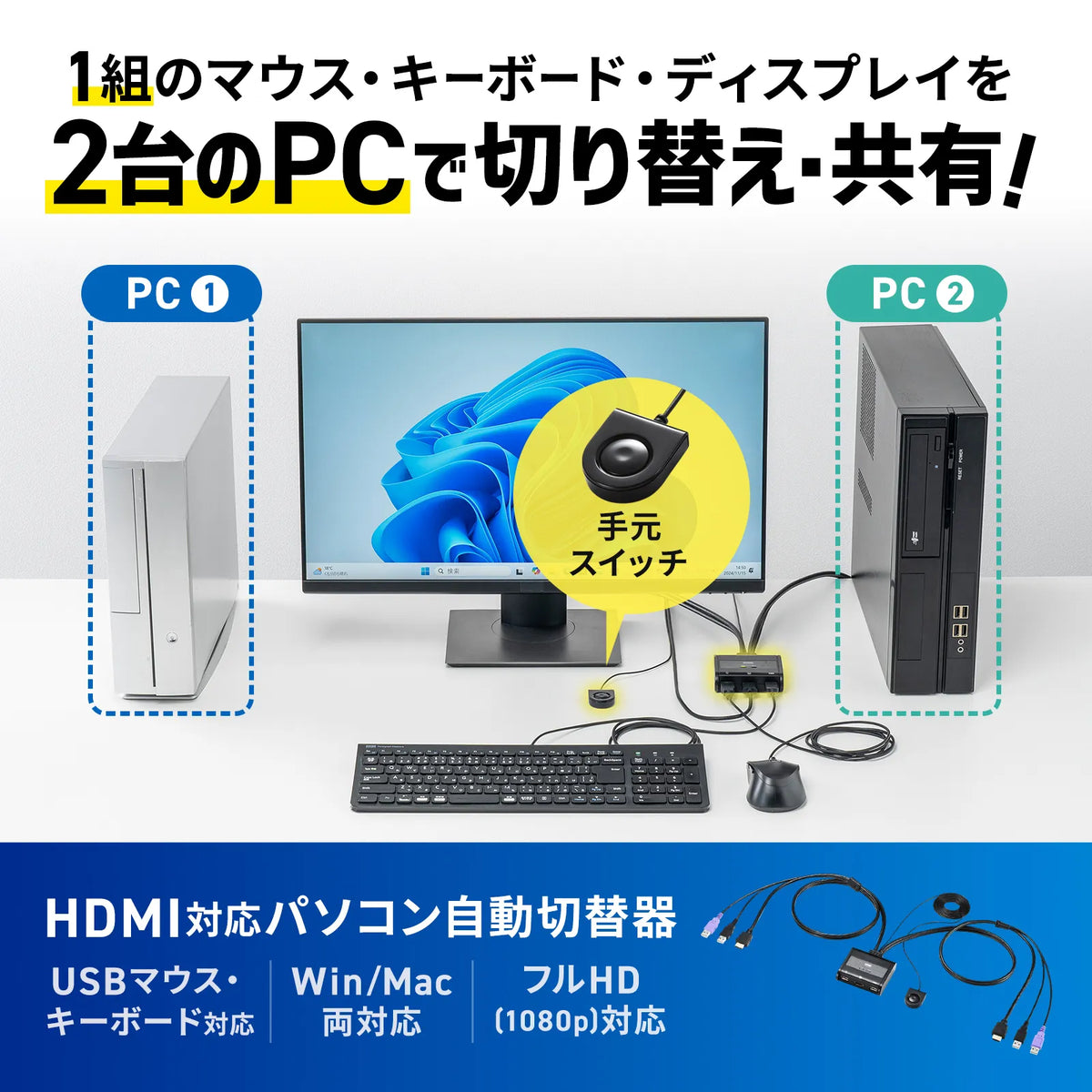
[Compatible with HDMI displays, USB keyboards, and USB mice. A compact cable-type KVM that can be easily switched with a hand-held switch.]
●One set of HDMI display, USB keyboard, and USB mouse can be used by switching between two computers.
●Compatible with not only desktop computers but also laptops and tablets.
●Equipped with a display emulation function (EDID reading circuit). It reads the EDID of the display and stores the information in the switcher, and by responding to each port during DDC communication, problems such as the screen resolution or screen size changing when the computer is started in the background are prevented.
●Supports a maximum resolution of 1920x1200 (WUXGA) and 1920x1080 (Full HD), and also supports widescreen output.
●HDCP compatible, so it can play copyrighted videos such as terrestrial digital broadcasts and Blu-ray discs.
●Because the keyboard port is emulated, two computers can be started at the same time. Also, a full startup is possible without switching ports when restarting (rebooting).
●Equipped with a hand-held switch that can be easily switched with a single button. Anyone can easily switch between them.
●Supports hotkey switching ([Ctrl] x2 or [ScrollLock] x2) that allows you to switch using keyboard input.
●No software installation is required; you can switch and use it simply by connecting it.
●It operates by receiving power from the computer's USB port, so no AC adapter is needed.
<Caution>
※Keyboards with N-key rollover functionality, such as gaming keyboards, are not supported.
■Interface: [For PC]
Display/HDMI (Type A) Male x2
USB A Connector Male x4
[For Console]
Display/HDMI (Type A) Female x1
Keyboard/USB A Connector Female x1
Mouse/USB A connector female x1
■Switching method: Hand switch
Hotkey switching (switch between PC A and B)... "Ctrl", "Ctrl", "Enter" or "ScrLock", "ScrLock", "Enter" (select one)
Auto scan switching (automatically switch between)... "Ctrl", "Ctrl", "A/a", "Enter" or "ScrLock", "ScrLock", "A/a", "Enter" (select one)
Disable auto scan mode... Press the "Esc" or "Space" key once
■Power consumption: Operating voltage - Power supplied from USB port / DC +5V
Current consumption / 530mA (maximum)
Power consumption / 2.5W (maximum)
■Operating temperature and humidity: Temperature / 0 to 50 degrees Humidity / 80% or less (non-condensing)
■Storage temperature and humidity: Temperature / -20 to 60 degrees Humidity: 80% or less (no condensation)
■Size: W78 x D72 x H24.35mm
■Cable length: PC1/0.9m, PC2/0.9m, Wired remote control side/1.8m
■Weight: 300g (including cable)
■Accessories: Instruction manual (with warranty)
●One set of HDMI display, USB keyboard, and USB mouse can be used by switching between two computers.
●Compatible with not only desktop computers but also laptops and tablets.
●Equipped with a display emulation function (EDID reading circuit). It reads the EDID of the display and stores the information in the switcher, and by responding to each port during DDC communication, problems such as the screen resolution or screen size changing when the computer is started in the background are prevented.
●Supports a maximum resolution of 1920x1200 (WUXGA) and 1920x1080 (Full HD), and also supports widescreen output.
●HDCP compatible, so it can play copyrighted videos such as terrestrial digital broadcasts and Blu-ray discs.
●Because the keyboard port is emulated, two computers can be started at the same time. Also, a full startup is possible without switching ports when restarting (rebooting).
●Equipped with a hand-held switch that can be easily switched with a single button. Anyone can easily switch between them.
●Supports hotkey switching ([Ctrl] x2 or [ScrollLock] x2) that allows you to switch using keyboard input.
●No software installation is required; you can switch and use it simply by connecting it.
●It operates by receiving power from the computer's USB port, so no AC adapter is needed.
<Caution>
※Keyboards with N-key rollover functionality, such as gaming keyboards, are not supported.
■Interface: [For PC]
Display/HDMI (Type A) Male x2
USB A Connector Male x4
[For Console]
Display/HDMI (Type A) Female x1
Keyboard/USB A Connector Female x1
Mouse/USB A connector female x1
■Switching method: Hand switch
Hotkey switching (switch between PC A and B)... "Ctrl", "Ctrl", "Enter" or "ScrLock", "ScrLock", "Enter" (select one)
Auto scan switching (automatically switch between)... "Ctrl", "Ctrl", "A/a", "Enter" or "ScrLock", "ScrLock", "A/a", "Enter" (select one)
Disable auto scan mode... Press the "Esc" or "Space" key once
■Power consumption: Operating voltage - Power supplied from USB port / DC +5V
Current consumption / 530mA (maximum)
Power consumption / 2.5W (maximum)
■Operating temperature and humidity: Temperature / 0 to 50 degrees Humidity / 80% or less (non-condensing)
■Storage temperature and humidity: Temperature / -20 to 60 degrees Humidity: 80% or less (no condensation)
■Size: W78 x D72 x H24.35mm
■Cable length: PC1/0.9m, PC2/0.9m, Wired remote control side/1.8m
■Weight: 300g (including cable)
■Accessories: Instruction manual (with warranty)
Share