1
/
of
11
SANWA SUPPLY
Automatic PC switch (2:1) SW-KVM2LPN2
Automatic PC switch (2:1) SW-KVM2LPN2
GTIN(JAN):4969887594612
SKU:SW-KVM2LPN2
Regular price
¥15,246 JPY
Regular price
Sale price
¥15,246 JPY
Quantity
Couldn't load pickup availability
Important: Return Policy
Please review your order carefully before completing the purchase. We do not accept returns or exchanges for customer errors (e.g., wrong size, color, or accidental purchase)
[Automatic PC switch that allows you to switch and share one set of PS/2 keyboard, PS/2 mouse, and display between two computers, with button switching also available]
● You can switch between two computers using one set of PS/2 keyboard, PS/2 mouse, and display.
● Switching is easy; just press the [Ctrl] key twice. It switches between two computers instantly.
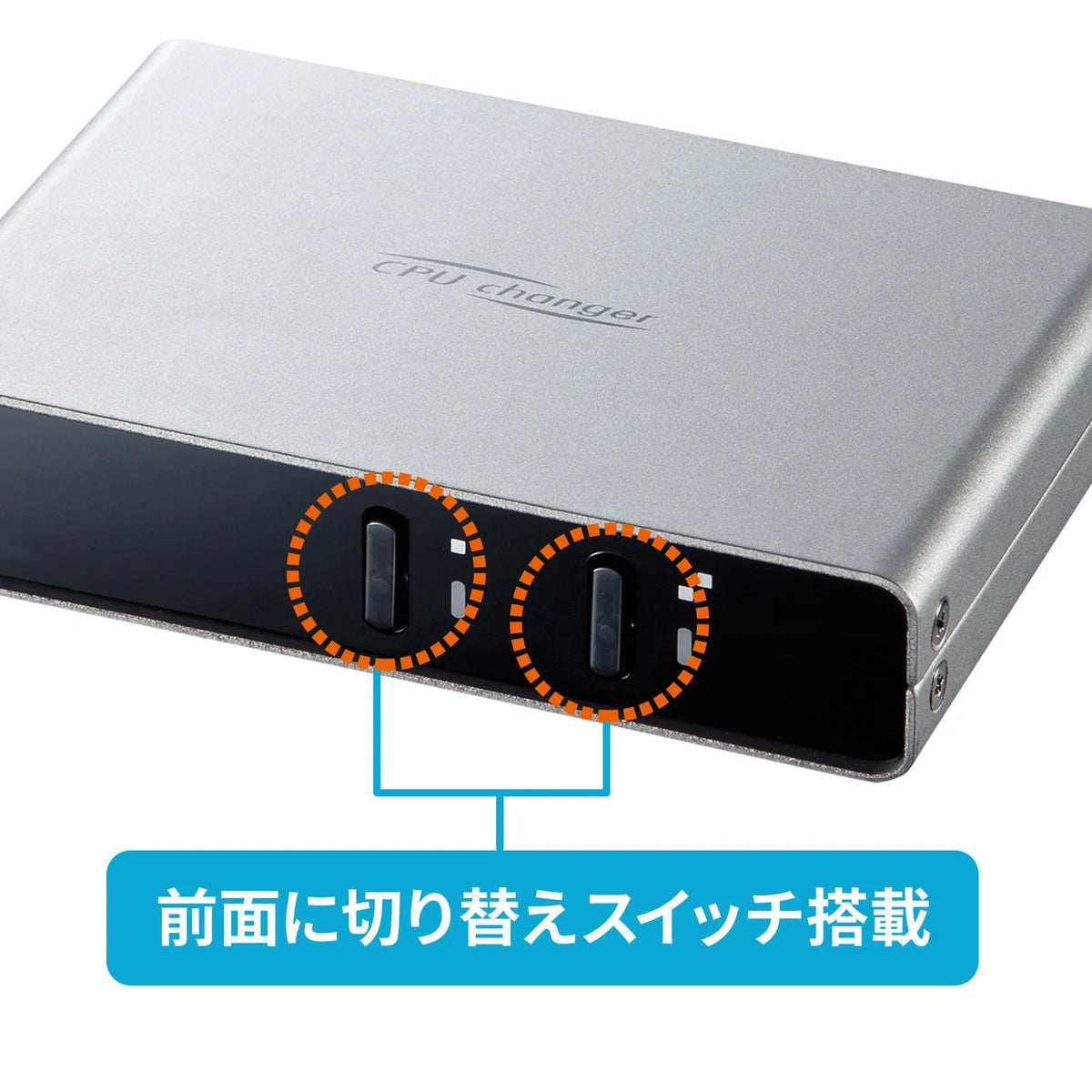
● You can also switch using the button on the front of the unit, and the switching status can be visually confirmed by the LED.
● You can switch consoles while the connected computers are powered on.
● Because it emulates the keyboard port and mouse port, it can fully boot up without switching ports when restarting (rebooting).
● You can lock the switching function (disable hotkeys) by pressing the [Ctrl] key + [F12] key. This product can be used even with games and applications that frequently use the [Ctrl] key.
● It is possible to start two connected computers simultaneously.
● It uses an all-in-one connector that combines the keyboard, mouse, and display signals into one. Easy to connect and allows for neat wiring.
●No software installation is required; simply connect and switch between devices.
●Equipped with an auto-scan function that automatically switches between connected computers, allowing you to monitor each computer.
●Supports display up to high resolution of 2048x1536 dots.
●Operates on power supplied from the computer's PS/2 keyboard port, eliminating the need for an AC adapter.
<Caution>
※Operation is not guaranteed for all computers, keyboards, and mice.
※Special buttons and function keys on keyboards and mice that require driver installation may not work via this switch.
※One-touch resume/suspend function is not supported.
※Microsoft Windows is a registered trademark of Microsoft Corporation in the United States and other countries.
■Interface:
For PC/All-in-one connector/SPDB15pin (female) x2
For console/All-in-one connector/SPDB15pin (male) x1
※Integrates VGA/keyboard/mouse signal lines.
■Power Consumption: Operating Voltage (Power supplied from PS/2 port) DC +5V
■Current Consumption: 210mA (maximum)
■Switching Method: Main unit button switching, hotkey switching, auto scan switching
■Operating Temperature and Humidity: Temperature/0 to 50 degrees Celsius, Humidity/80% or less (non-condensing)
■Storage Temperature and Humidity: Temperature/-20 to 60 degrees Celsius, Humidity/80% or less (non-condensing)
■Size: W120 x D80 x H25 mm (main unit size)
■Weight: 358g
■Accessories: Dedicated cable for PC connection (1.2m x 2),
Dedicated cable for console connection (0.25m x 1), instruction manual, warranty card
● You can switch between two computers using one set of PS/2 keyboard, PS/2 mouse, and display.
● Switching is easy; just press the [Ctrl] key twice. It switches between two computers instantly.
● You can also switch using the button on the front of the unit, and the switching status can be visually confirmed by the LED.
● You can switch consoles while the connected computers are powered on.
● Because it emulates the keyboard port and mouse port, it can fully boot up without switching ports when restarting (rebooting).
● You can lock the switching function (disable hotkeys) by pressing the [Ctrl] key + [F12] key. This product can be used even with games and applications that frequently use the [Ctrl] key.
● It is possible to start two connected computers simultaneously.
● It uses an all-in-one connector that combines the keyboard, mouse, and display signals into one. Easy to connect and allows for neat wiring.
●No software installation is required; simply connect and switch between devices.
●Equipped with an auto-scan function that automatically switches between connected computers, allowing you to monitor each computer.
●Supports display up to high resolution of 2048x1536 dots.
●Operates on power supplied from the computer's PS/2 keyboard port, eliminating the need for an AC adapter.
<Caution>
※Operation is not guaranteed for all computers, keyboards, and mice.
※Special buttons and function keys on keyboards and mice that require driver installation may not work via this switch.
※One-touch resume/suspend function is not supported.
※Microsoft Windows is a registered trademark of Microsoft Corporation in the United States and other countries.
■Interface:
For PC/All-in-one connector/SPDB15pin (female) x2
For console/All-in-one connector/SPDB15pin (male) x1
※Integrates VGA/keyboard/mouse signal lines.
■Power Consumption: Operating Voltage (Power supplied from PS/2 port) DC +5V
■Current Consumption: 210mA (maximum)
■Switching Method: Main unit button switching, hotkey switching, auto scan switching
■Operating Temperature and Humidity: Temperature/0 to 50 degrees Celsius, Humidity/80% or less (non-condensing)
■Storage Temperature and Humidity: Temperature/-20 to 60 degrees Celsius, Humidity/80% or less (non-condensing)
■Size: W120 x D80 x H25 mm (main unit size)
■Weight: 358g
■Accessories: Dedicated cable for PC connection (1.2m x 2),
Dedicated cable for console connection (0.25m x 1), instruction manual, warranty card
Share