1
/
of
1
SANWA SUPPLY
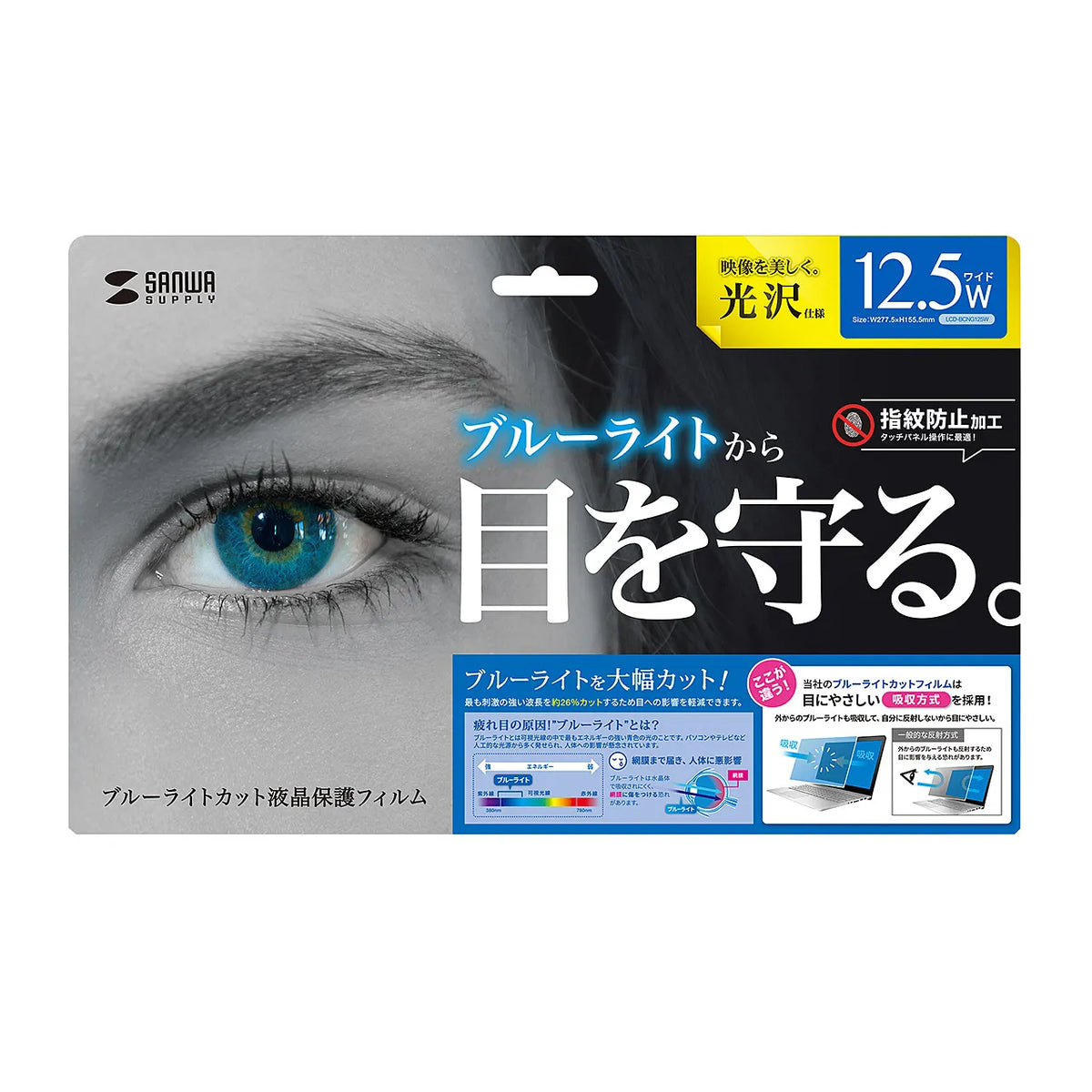
12.5-inch widescreen blue light cut LCD protective film, anti-fingerprint, glossy film LCD-BCG125W
12.5-inch widescreen blue light cut LCD protective film, anti-fingerprint, glossy film LCD-BCG125W
GTIN(JAN):4969887896945
SKU:LCD-BCG125W
Regular price
¥2,686 JPY
Regular price
Sale price
¥2,686 JPY
Quantity
Couldn't load pickup availability
Important: Return Policy
Please review your order carefully before completing the purchase. We do not accept returns or exchanges for customer errors (e.g., wrong size, color, or accidental purchase)
[12.5-inch widescreen compatible blue light cut LCD protective anti-fingerprint glossy film.]
●Cuts approximately 26% of the main blue light wavelength of 450nm from LED backlights.
●Concentrated blue light cut that is not easily absorbed by the lens of the eye and may damage the retina. Recommended for preventing eye strain.
●Reduces blue light and absorbs it both inside and outside the film, making it gentle on the eyes.
●Anti-fingerprint coating prevents fingerprints from sticking to the film.
●Glossy type makes the LCD screen clear and vivid.
●Uses silicone material on the adhesive surface, so it sticks perfectly to the LCD screen.
●No double-sided tape is required.
●Touch panel compatible, ideal for Windows touch operation.
※Not compatible with ultrasonic, electromagnetic induction, or digitizer methods.
●Protects the LCD screen from dust, fingerprints, scratches, etc.
1. With the computer powered off, wipe the LCD screen clean with a soft cloth such as a cleaning cloth. (Dust and dirt can cause air bubbles when applying the film.)
2. Before applying the film, peel off the release sheet. The side that is peeled off will be the side that adheres to the LCD screen. (When peeling off the release sheet, do so in an area with as little dust as possible to prevent static electricity from attracting dust.)
3. Place the film on the LCD screen and gently and slowly apply it from one edge. Using a soft cloth or the included spatula to push out the air will make it easier to apply.
■Material: Adhesive surface/silicone film, outer layer/PET (polyethylene terephthalate)
■Size: W277.5 x D0.2 x H155.5 mm
■Quantity: 1 sheet
■Reflectance: 4.37%
■Transmittance: 79.3%
■UV cut: 99.9%
■Pencil hardness: 2 to 3H
*The above are measured values and not guaranteed values.
■Accessories: Spatula for installation
●Cuts approximately 26% of the main blue light wavelength of 450nm from LED backlights.
●Concentrated blue light cut that is not easily absorbed by the lens of the eye and may damage the retina. Recommended for preventing eye strain.
●Reduces blue light and absorbs it both inside and outside the film, making it gentle on the eyes.
●Anti-fingerprint coating prevents fingerprints from sticking to the film.
●Glossy type makes the LCD screen clear and vivid.
●Uses silicone material on the adhesive surface, so it sticks perfectly to the LCD screen.
●No double-sided tape is required.
●Touch panel compatible, ideal for Windows touch operation.
※Not compatible with ultrasonic, electromagnetic induction, or digitizer methods.
●Protects the LCD screen from dust, fingerprints, scratches, etc.
1. With the computer powered off, wipe the LCD screen clean with a soft cloth such as a cleaning cloth. (Dust and dirt can cause air bubbles when applying the film.)
2. Before applying the film, peel off the release sheet. The side that is peeled off will be the side that adheres to the LCD screen. (When peeling off the release sheet, do so in an area with as little dust as possible to prevent static electricity from attracting dust.)
3. Place the film on the LCD screen and gently and slowly apply it from one edge. Using a soft cloth or the included spatula to push out the air will make it easier to apply.
■Material: Adhesive surface/silicone film, outer layer/PET (polyethylene terephthalate)
■Size: W277.5 x D0.2 x H155.5 mm
■Quantity: 1 sheet
■Reflectance: 4.37%
■Transmittance: 79.3%
■UV cut: 99.9%
■Pencil hardness: 2 to 3H
*The above are measured values and not guaranteed values.
■Accessories: Spatula for installation
Share